Posts

Showing posts with the label Linux Scraps

Run your apps in the system background
Image
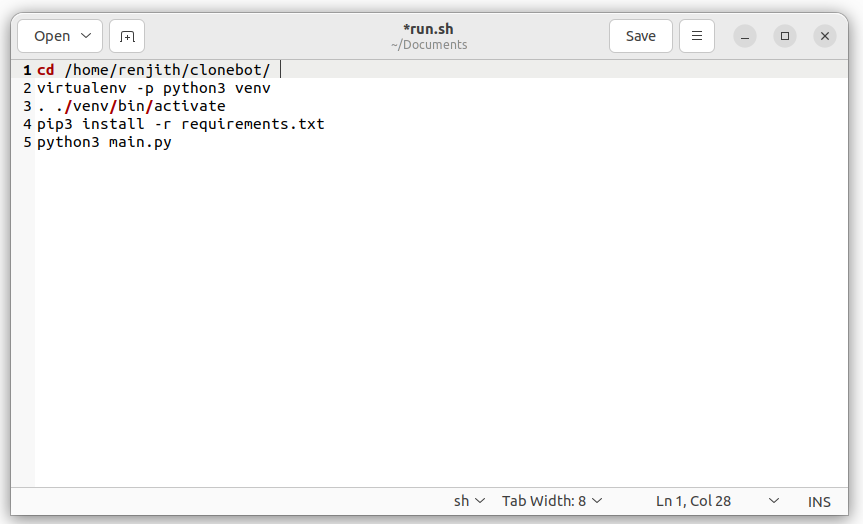
The cron utility is a job-scheduling tool found on all Linux and Unix operating systems, as well as macOS. Although cron is typically used to schedule jobs at fixed times, dates, and intervals, it can also launch jobs at system boot time. This guide explains how to use the cron utility and the crontab file to run a job or script when the system boots. Here we can use this facility to run a specific file or an entire projects like Telegram bots, applications or any dtabase operations at the time of boot up and the applications will be continue to run in backgroud, and there wont be any interfaces for the same on the desktop. Here I'm demostrating a script that run a Telegram Bot. I'm using an Ubuntu PC for the same. You can use your VPS / any linux distros, or even small PCs like raspberry Pi too for this purpose. 1. First, I need to create a shell script and save it in any directory. Here I'm using the file name run.sh Here in t...

Create a watch dog script for Local Git Repository to Pull commits !

 How to create a watch dog scrip for a git folder in your local computer? Need: We clone a public repository to our local computer and executing the code from there. When doing  commit to the pull request done in the upstream master, in each and every time we need to pull the same manually to our local repository.  To solve the issue, we can create a script and configure the same to the start up options will update the local repository with respect to  the parent repository changes. Clone a repository to a local folder using the following commands In Linux Terminal, run the following code: git clone https://<link_to_the_GitHub_repository> Now what i doing is,  am renaming the cloned repository to 'git_folder' Change the directory to the 'git_folder' using cd command  Run in Linux terminal: nano script_run.sh                        #Save this code as script_run.sh (Can customise the ...

Dual Boot Grub Showing Lines And Doesn't Boot to OS

Image
*** Dual Boot Grub Showing Lines And Doesn't Boot to OS *** Solution :- You could try to disable the graphical grub spash. 1.  $ sudo gedit /etc/default/grub ( can use 'nano' insted of 'gedit' ) 2.  Uncomment the line:  # GRUB_TERMINAL="console" (remove the #) after that, run sudo update-grub and see if it helped.

How to restore Grub after installing windows (Linux Forms)

Image
This page documents how to restore or recover the boot-loader (GRUB) after installing Windows. Some reasons to repair your boot-loader might include installing Microsoft Windows after you have installed Ubuntu, adding or removing a hard drive, or changing hard drive settings. Note: this tutorial does not apply if you had installed Ubuntu inside Windows (via the  Wubi  installer).  Boot from an Ubuntu Live CD or Live USB Once up and running,  Open a Terminal   Type  sudo su  (press enter after typing each command) Type  fdisk -l   Note which device contains your Linux partition (IE: /dev/sda1)  Type  sudo mount /dev/sd x#  /mnt  ( replacing  x#  with your actual device and partition number) Type  sudo grub-install --root-directory=/mnt/ /dev/sda After the above operation terminal shows "no error reported". Type  reboot  (to reboot your PC) Ma...